What is the Shexie Integration?
The Shexie and Heidi integration embeds a powerful AI medical scribe directly into your Shexie Platinum workspace. Simply open Heidi in a Shexie patient record and the scribe automatically transcribes your session into a structured note, along with any required clinical documents. Custom templates also help ensure that AI-supported documentation sounds exactly like you and follows your preferred format.
Advantages of the Heidi and Shexie Integration
The Shexie and Heidi integration offers wide-ranging benefits for physicians and medical specialists of all backgrounds. At a broad level, the integrated AI scribe helps to significantly reduce the time spent on clinical documentation. However, the advantages for clinicians and practice managers extend far beyond note-taking efficiency.
Here are the main reasons doctors and administrators love having Heidi integrated with Shexie:
Reduced Cognitive Load
Administrative burden isn’t just about spending excessive amounts of time on notes. Providers also struggle with the sense of exhaustion and cognitive depletion that comes with spending hours each day on documentation. With the Shexie Platinum and Heidi integration, clinicians just like you report feeling far less cognitively taxed at the end of a busy day.
Dr. Meera Rajah, a GP and private practice owner with a special interest in cognitive load, states, “Using Heidi has meant that by the end of the clinic I don’t feel as exhausted. It has significantly reduced the load on my working memory, allowing me to be more present with patients. They get a brighter and more engaged me.”
Increased Clinical Capacity
The Shexie integration with Heidi enables providers to recoup one hour or more each day that was previously lost to administrative tasks. This liberated time can be utilised to increase clinical capacity, work on professional development, focus on practice growth, or improve work-life balance.
“I increasingly have had a backlog of children who need to be seen,” states Dr. Catherine Skellern, a developmental paediatrician in private practice. “But with Heidi, I’m able to fit in more appointments into my day. I’m able to manage my practice more efficiently and get home at a reasonable time. It’s been a huge game-changer.”
Ultimate Flexibility
Whatever your specialty, the Heidi and Shexie integration adapts to your unique workflow and documentation preferences. Templates within Heidi are infinitely customisable, ensuring you always receive an output that matches your exact specifications.
“The ability to create different templates for standard procedures with word-for-word text in the letter means that patients receive a thorough letter,” states neurosurgeon, Mr. Gordon Grahovac. “The quality of my documentation has improved significantly, and my patients notice. They feel reassured that everything has been documented properly.”
World-Class Security
Heidi meets the rigorous privacy and security standards expected by Australian medical specialists. Heidi is APP compliant and also meets other important safety standards, such as SOC 2 and ISO 27001 certification. The Shexie integration preserves all of Heidi’s security features, ensuring your data remains safe and your practice is compliant.
Real-time notes, real-world impact: In one of the world’s largest clinical rollouts of ambient AI, Heidi has been proven to:
- Reduce time spent per consult on documentation by 51%
- Increase note quality satisfaction by 38%
- Decrease documentation-related stress by 58%
- Boost confidence in documentation accuracy by 33%
- Reduce after-hours admin by 61%
- Improve work-life balance satisfaction by 45%
Clinicians consistently tell us it’s not just about eliminating administrative burden and minimizing cognitive load, but it’s also about being more present with their patients and reclaiming their time.
How to Implement the Shexie Integration: Quick Guide
The Shexie integration with Heidi is simple to set up and easy to use. Once the Heidi widget is activated in Shexie, transcribing a session is as straightforward as opening the scribe and pressing “Start visit.” Here’s a quick overview of how to implement the Shexie integration:
Step 1: Contact Shexie to Activate
Start by calling Shexie’s dedicated support hotline at 1300 743 943 (1300 SHEXIE) to request activation of the Heidi integration. Shexie’s support team will complete the activation, ensuring it’s correctly configured for your specific Shexie Platinum environment.
Step 2: Launch the AI scribe
Once the activation is complete, open a patient record in Shexie Platinum and look for the Heidi widget icon. Click the icon to launch the AI medical scribe, which appears as a floating widget within Shexie. If you already have a Heidi account, you can log in with your existing credentials. Otherwise, you’ll be prompted to create an account and activate your free 30-day trial (no credit card required).
Step 3: Transcribe Your Session
Press “Start visit” in the Heidi widget to begin real-time transcription of your session. Background information, such as patient history, notes from previous appointments, and imaging or test results can be added to the Context tab at any stage. Press “Stop” when the consultation is finished and Heidi will automatically generate a structured note.
Step 4: Generate Additional Documents
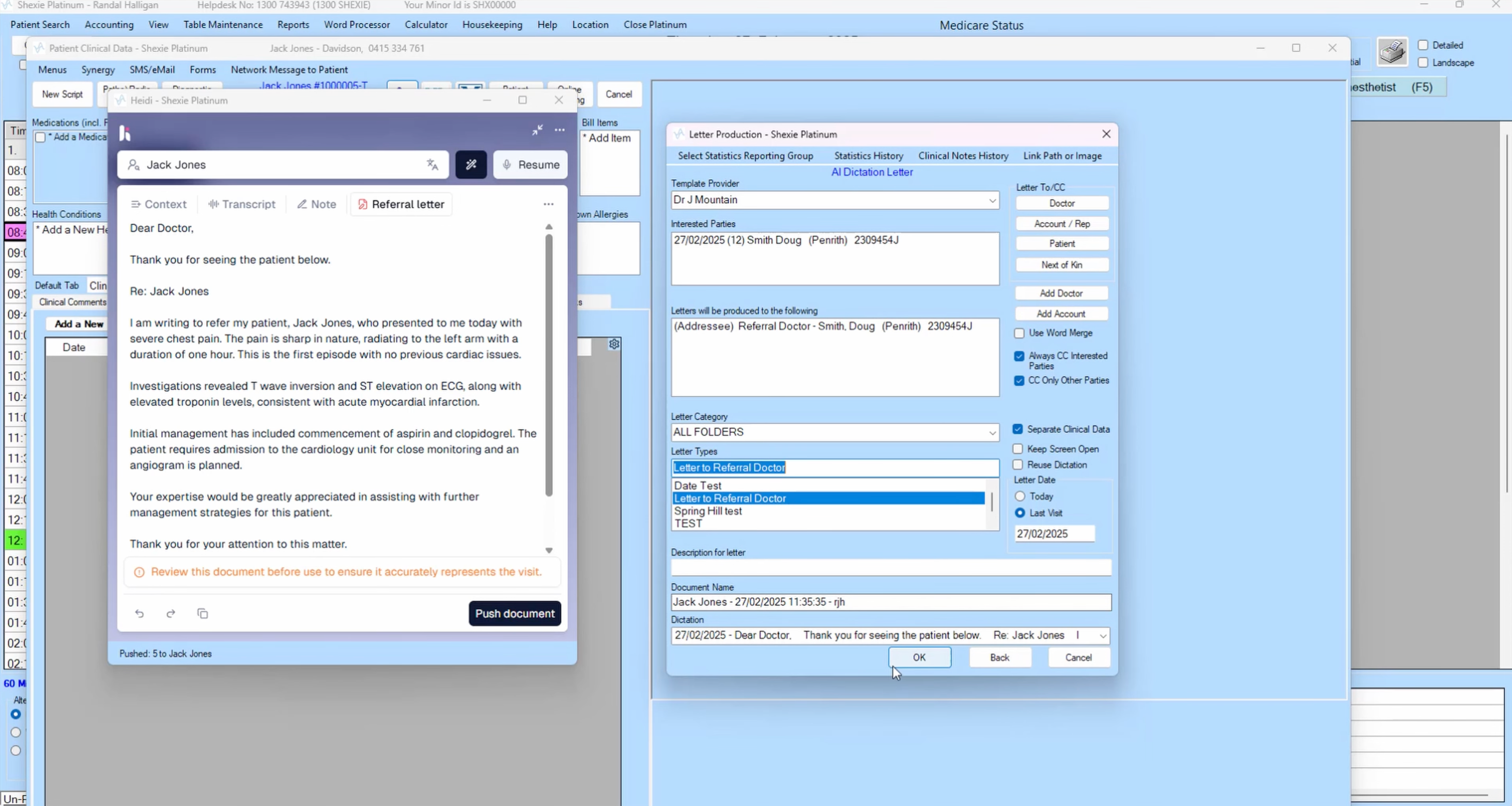
With the core note complete, you can prompt Heidi to generate additional documents from the same session. Simply select a template and Heidi will produce clinical documents like referral letters, discharge summaries, patient instructions and medical reports. Each document will be ready within seconds and can be pushed instantly to Shexie.
Step 5: Review and Save in Shexie
Review your notes and documents for accuracy and completeness. Any required edits are easily made within Heidi by typing or cursor dictation. Once satisfied, push outputs to Shexie, where they will populate in the patient’s clinical record.
Try the Heidi and Shexie Platinum Integration Today
The Shexie integration makes Heidi available directly within your practice management system. Therefore, you won’t have to change your workflow at all to enjoy the benefits of AI-supported documentation. Like Shexie, Heidi also has a full-featured mobile app, so you can take your AI scribe with you wherever you practice.
Activate your free 30-day trial to access the Shexie Platinum and Heidi integration today. You don’t need to pay anything upfront or even provide your credit card details to access the trial. Just set up your free account and enjoy everything Heidi and the Shexie integration have to offer.