Zurück zu allen Integrationen

VeriClaim
Vericlaim
Heidi integrates with VeriClaim through Patient Clinical Records (PCR), VeriClaim's Clinical Notes platform.
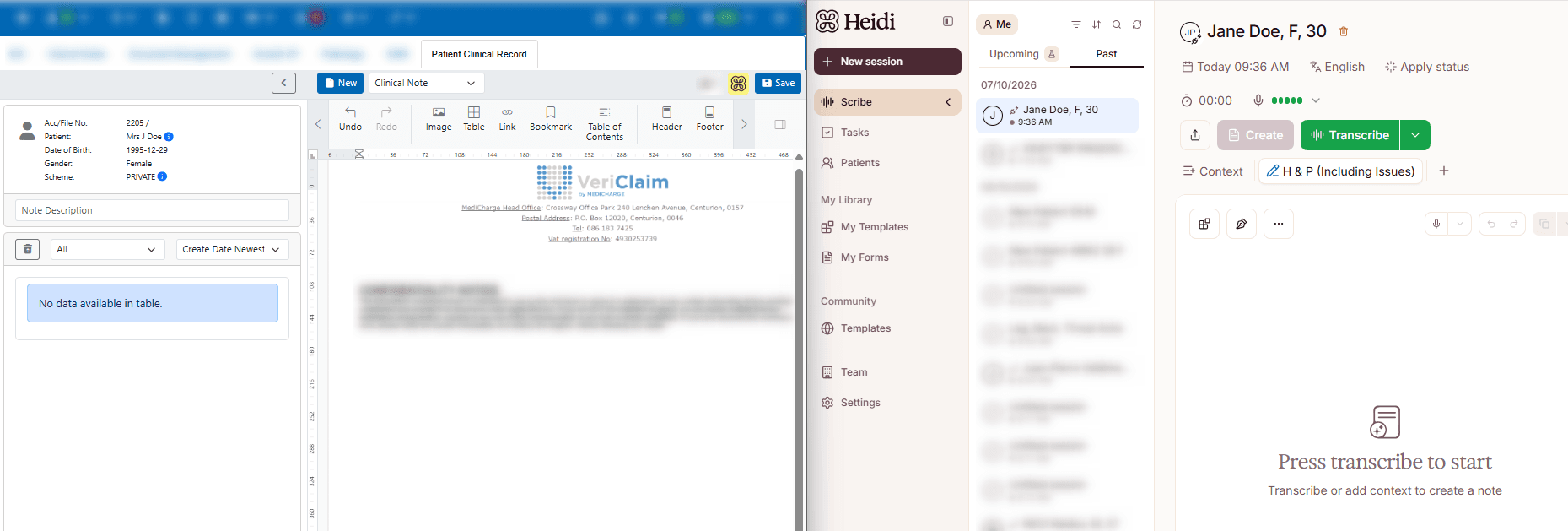
Über die VeriClaim-Integration mit Heidi
Overview
Heidi integrates with VeriClaim through Patient Clinical Records (PCR), VeriClaim's Clinical Notes platform.
From the patient's PCR screen, clinicians can launch Heidi directly from VeriClaim. Heidi opens in a separate browser tab, where the clinician can use Heidi to create clinical notes and supporting documents. Content from the Heidi session then synchronises back to VeriClaim and is available from the patient's PCR timeline.
How does it work?
Open the patient record: Navigate to Clinical Notes and open the patient's Patient Clinical Record (PCR).
Launch Heidi: Select the Heidi icon from the PCR screen. This is the entry point used for synchronisation between VeriClaim and Heidi.
Continue in Heidi: Heidi opens in a separate browser tab. On first access through VeriClaim, the user signs in using the email address and password registered with Heidi.
Create the clinical documentation: A Heidi session is initiated, and the clinician can use Heidi to generate the required clinical notes or documents.
Synchronise to VeriClaim: Content from the Heidi session synchronises back to VeriClaim and appears on the patient's PCR timeline as a Session entry.
Access the record: The Heidi session can be expanded in VeriClaim to access the synced Consult Note/SOAP Note, transcript, and documents.
Getting set up
The provider must have a registered Heidi account and provide the email address associated with that account for the integration setup on VeriClaim. The Heidi integration is configured for the relevant provider and authorised Practice users (the VeriClaim User Access form to be completed for other users). Users must have the required Clinical Notes access to be enabled for the integration.